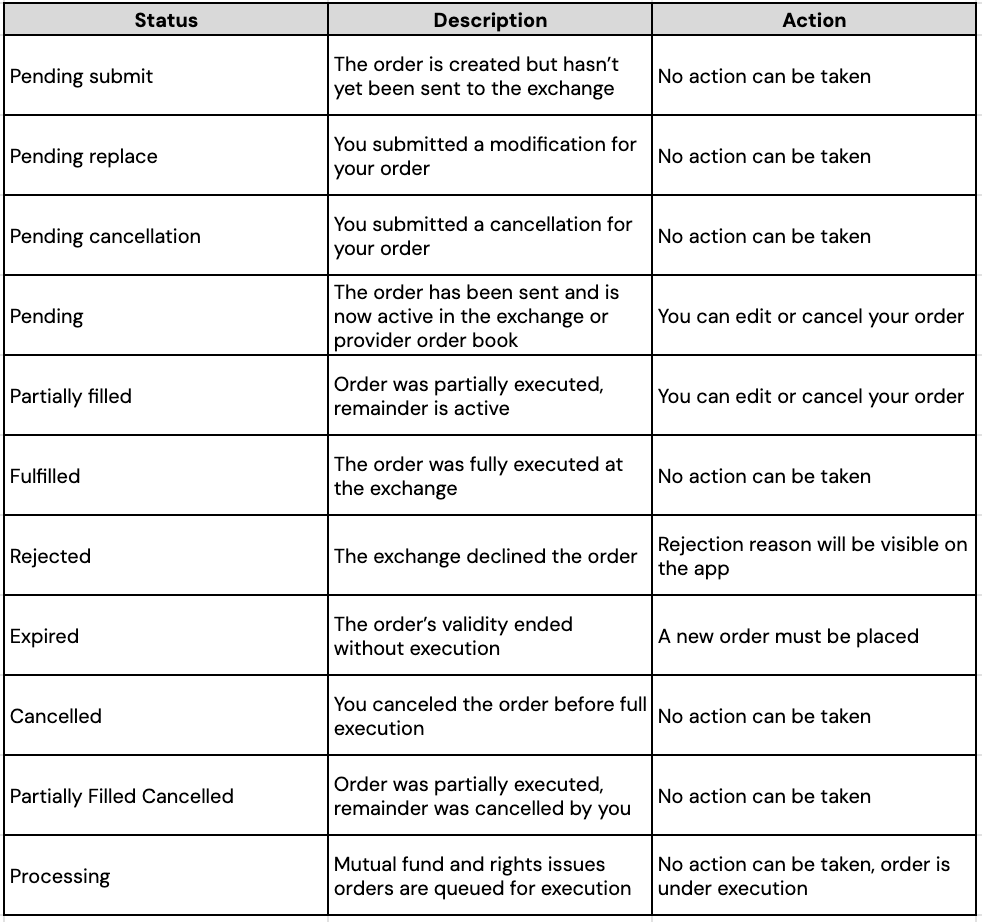
When placing an order on Thndr, you may see different order types, statuses
Order Types
Thndr supports multiple order types. Each type behaves differently when it reaches the market.
Cash/Unit (Market price) – Market Order
A market order is used to buy or sell immediately at the best available price.
You can place a market order using 2 methods:
- Cash (Market price)
- Units (Market price)
Market orders are executed instantly if the market is open and there are offers to buy/sell the stock
*You may receive a price different from what you saw on the screen
Stop Orders (Thndr Trader Only)
Stop orders are conditional market orders that are triggered if the price falls below a trigger price that you set. You can read more about stop orders here.
What you can use stop orders for stocks and rights
*Stop orders do not guarantee the exact price you set. They guarantee a market order is triggered, not the final execution price.
Recurring Orders
Recurring orders are market orders for a stock or fund that automatically trigger at regular intervals (daily, weekly, or monthly)
Limit Orders
A limit order is used to buy or sell only at a specific price or better. Limit orders stay in the market until matched, canceled, or expired.
*Limit orders May not execute if the market never reaches your price
*Limit orders are automatically set to expire in 1 month.
Advanced limit orders
Advanced limit orders allow you to control:
- Order type: All or none, Minimum fill
- Expiry Type: Good till day, Good till day, Good till cancel, Fill or Kill (FOK) and Immediate or cancel (IOC)
You can read more about advanced limit orders here.
Order Statuses
An order can go through several stages depending on where it is in the trading process.