

Disclaimer : Activities in the UAE Market are conducted through Thndr Financial Ltd, a financial institution licensed by the FSRA of ADGM.
In order to register your account with the ADX it is required you present an IBAN Letter.
Important:
- If you don’t have an IBAN statement, a bank account statement can be uploaded instead.
- The bank account must be solely in your name (joint accounts are not accepted).
What is an IBAN Statement?
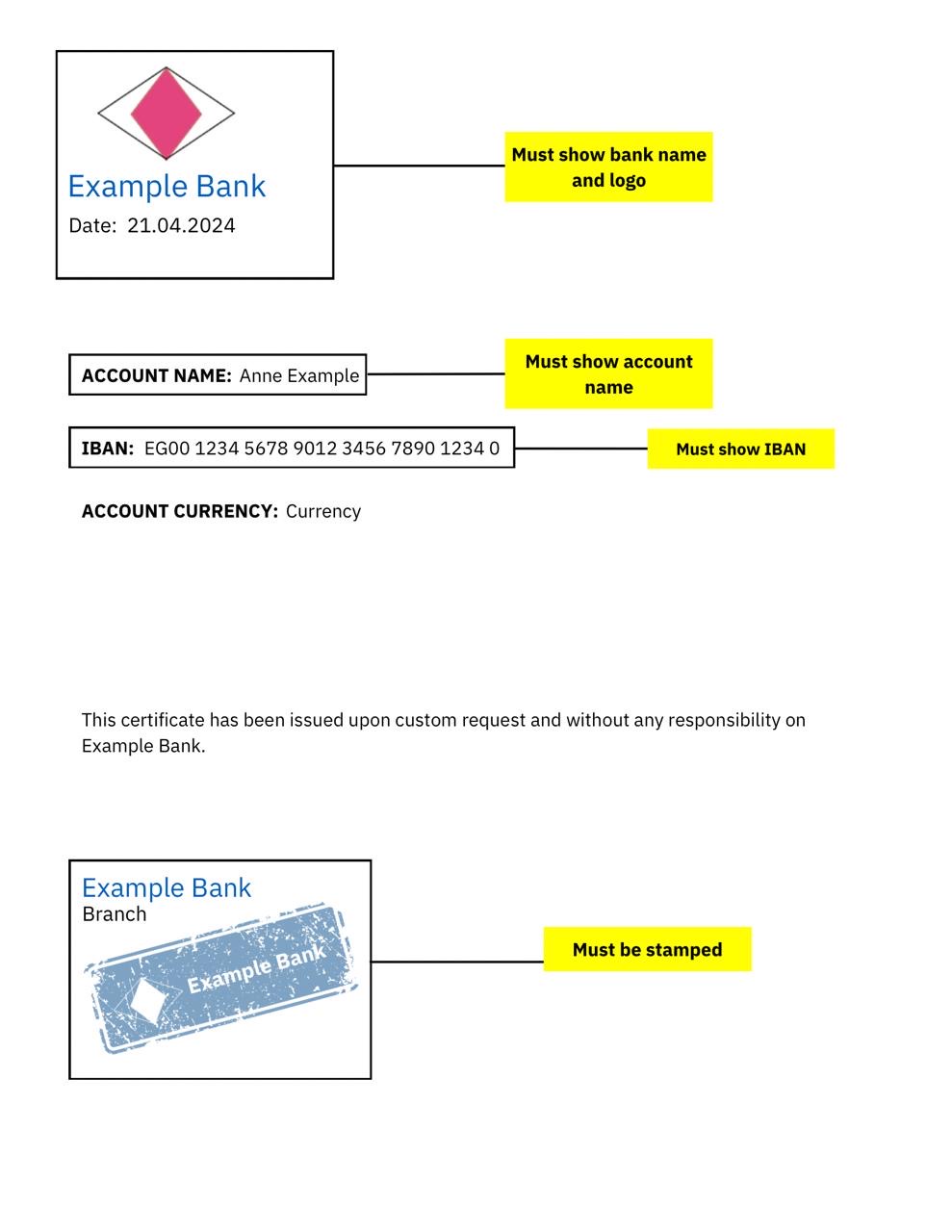
An IBAN Statement is a document issued by your bank to prove your ownership of a bank account. The document must include:
- Your full name (account holder)
- Your IBAN number
- Your bank’s stamp
- Your full name (account holder)
Example IBAN Statement
How to Upload my IBAN Statement?
Option 1: During registration
Complete your basic information in the app by entering:
- Phone number
- Date of birth
- Address
- Occupation
Follow the steps to:
- Take a selfie.
- Upload a picture of your Emirates ID, Passport, or other accepted ID.
- Upload a clear picture of your IBAN statement or bank account statement.
Option 2: From My Hub
- Go to “My Hub”
- Tap on “Account”
- Tap on “My Documents”
- Tap (+) on “IBAN Statement”
- Upload your IBAN statement or bank account statement.

